Your solar system as a widget.
Generation, battery, EV charger and grid in one widget on your home screen and lock screen, whichever brand each one is. Andon shows what your system reports, on iPhone and iPad. No VPN, no port forwarding.
Free for 7 days, then €4.99 a month.
One roof, many apps.
One app per brand
Inverter, battery and EV charger rarely come from the same maker. So you open three apps to answer one question: is there enough excess solar to charge the car?
Away from home, only with a VPN
Your data lives on your home network. Remote access means a VPN, port forwarding or the maker's cloud. Each one is a project of its own.
The widget shows the wrong thing
A maker's widget shows what the maker thinks matters. You can't add the state of charge you look for, or your own warning when the battery runs low.
A house with solar, to try.
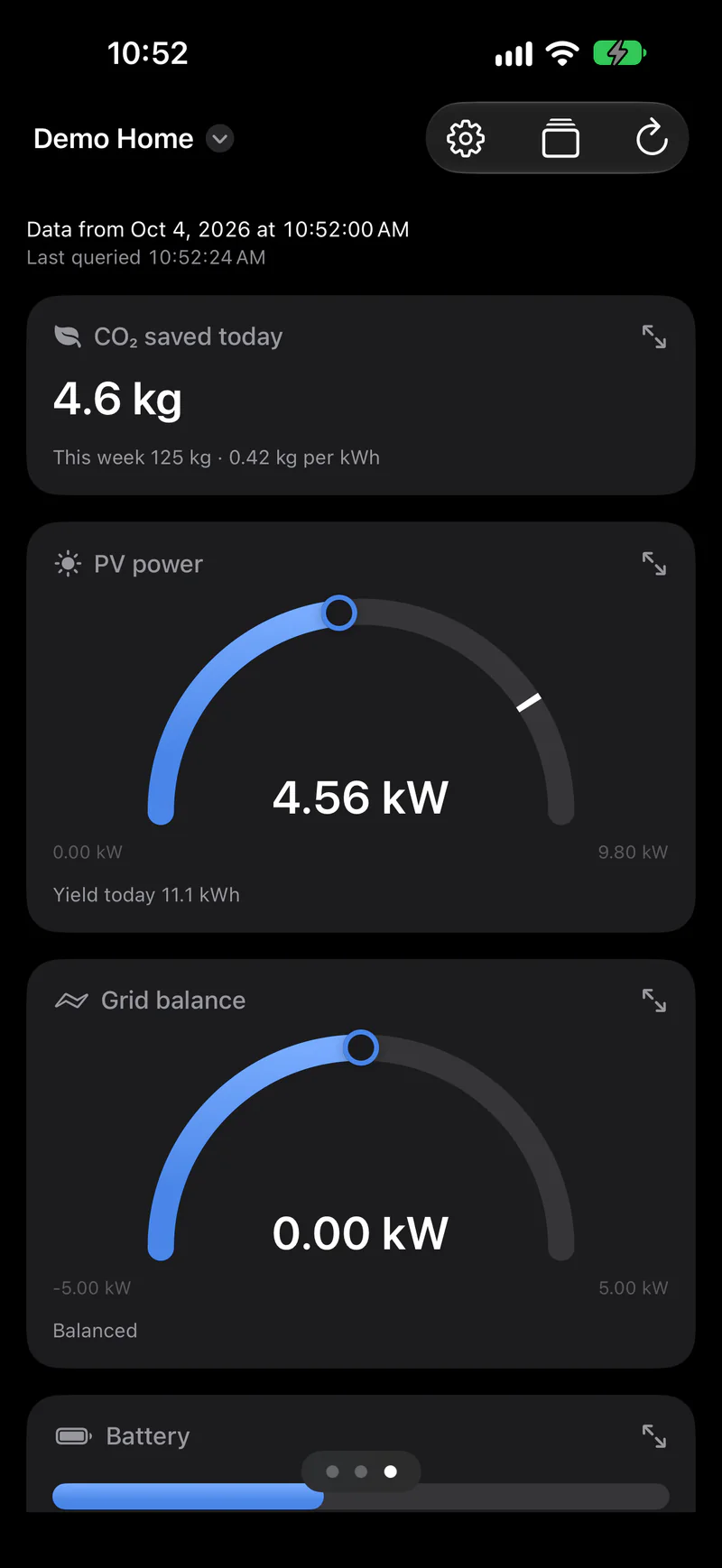
The demo simulates a house with solar, battery, EV charger and heat pump. Scan the code with the Andon app and it's on your iPhone.
- ✓Now: solar power, grid balance with export, battery level.
- ✓Today: generation and use as a curve, self-consumption and self-sufficiency, use per appliance.
- ✓Planning: this week's yield, a three-day forecast, the electricity price.
- ✓Around the house: EV charger, heat pump, hot water and rooms.
House with solar
Photovoltaics, battery, grid import and export, rooms. Hardly any traffic lights, plenty of colour: numbers you like to see, without anything raising an alarm.
From your inverter to your iPhone.
Andon doesn't read your inverter itself. A small piece in your network collects the values, encrypts them and sends them off. Usually that's Node-RED, which many already run.
Collect the values
Node-RED reads what your system offers: evcc's MQTT values, data points from ioBroker or Home Assistant, Modbus TCP straight from the inverter.
Encrypt and send
The Node-RED package encrypts the values inside your network and sends them to the relay. The key stays with you.
Look
Your iPhone fetches the values and decrypts them. When a status changes, your source wakes the widget. Otherwise iOS refreshes it on its own schedule, the open app every minute.
Many inverters from SMA, Fronius, Kostal, Huawei or Victron speak Modbus TCP.
evcc to iPhone, with one function node.
If you run evcc, you're nearly done. evcc publishes its values over MQTT once evcc.yaml names a broker. An MQTT in node subscribes to evcc/#, a function node maps the values to your tiles, andon out sends them.
- ✓The tile IDs (
t_pv_now,t_battery…) are the demo's. You choose yours in the configurator. - ✓evcc reports power in watts, the tiles show kW.
- ✓The status is your call: here the battery turns amber below 20 %.
- ✓ioBroker, Home Assistant or Modbus follow the same pattern: get the value, tile ID as
msg.topic, done.
The package step by step: Andon for Node-RED.
// MQTT in (topic evcc/#) → this node → andon out.
// evcc sends watts, the tiles show kW.
const kw = (w) => Math.round(Number(w) / 10) / 100;

switch (msg.topic) {
  case 'evcc/site/pvPower':
    return { topic: 't_pv_now', payload: kw(msg.payload) };
  case 'evcc/site/grid/power': // below 0: feeding in
    return { topic: 't_grid', payload: kw(msg.payload) };
  case 'evcc/site/battery/soc': {
    const soc = Number(msg.payload);
    // The verdict is yours: a low battery turns amber.
    return { topic: 't_battery', payload: { value: soc,
      status: soc < 20 ? 'warning' : 'ok' } };
  }
  case 'evcc/loadpoints/1/charging':
    return { topic: 't_wallbox',
      payload: String(msg.payload) === 'true' ? 'Charging' : 'Ready' };
}
return null;
Adds to your solar system, replaces nothing.
Every brand, one widget
Inverter, battery, EV charger, heat pump: whatever Node-RED can read ends up in the same view.
No way into your network
Your network only sends out. No port forwarding, no VPN, no dynamic DNS.
End-to-end encrypted
The relay only passes on sealed envelopes. Only your paired devices can read them.
Your tiles, your rules
You decide what's on the lock screen and when it turns amber. No maker decides for you.
Questions about the solar widget.
Does it work with my inverter?
If Node-RED or a script can get at the values, yes. Most ways go through Modbus TCP, MQTT or an HTTP API. If evcc, ioBroker or Home Assistant already runs, take the values from there.
Do I need a VPN or port forwarding?
No. Node-RED only sends out, over HTTPS to the relay. Nobody connects in to you.
How up to date is the widget?
When a status changes, say the battery runs low, your source wakes the widget, usually within a minute. Otherwise iOS decides when to reload it, typically about every 15 minutes. The open app fetches new values every minute.
Can I see the battery level on the lock screen?
Yes. Any tile can become a widget on the home screen and lock screen, and in StandBy on iPhone. On iPad the app shows the whole view, for instance as a display in the hallway.
What does the relay see of my data?
No content. The values are encrypted inside your network; the key stays there and on your devices. The relay only sees that a view was updated, and when. More under How it works.
What do I need?
An iPhone or iPad with the Andon app, free for 7 days, then a monthly subscription in the App Store. Plus Node-RED or a script in your network. The Node-RED package is free.
Andon elsewhere
Try it with your own numbers.
Build tiles in the configurator, create a view, pair your iPhone. Node-RED does the rest.