Digital andon for your shop floor.
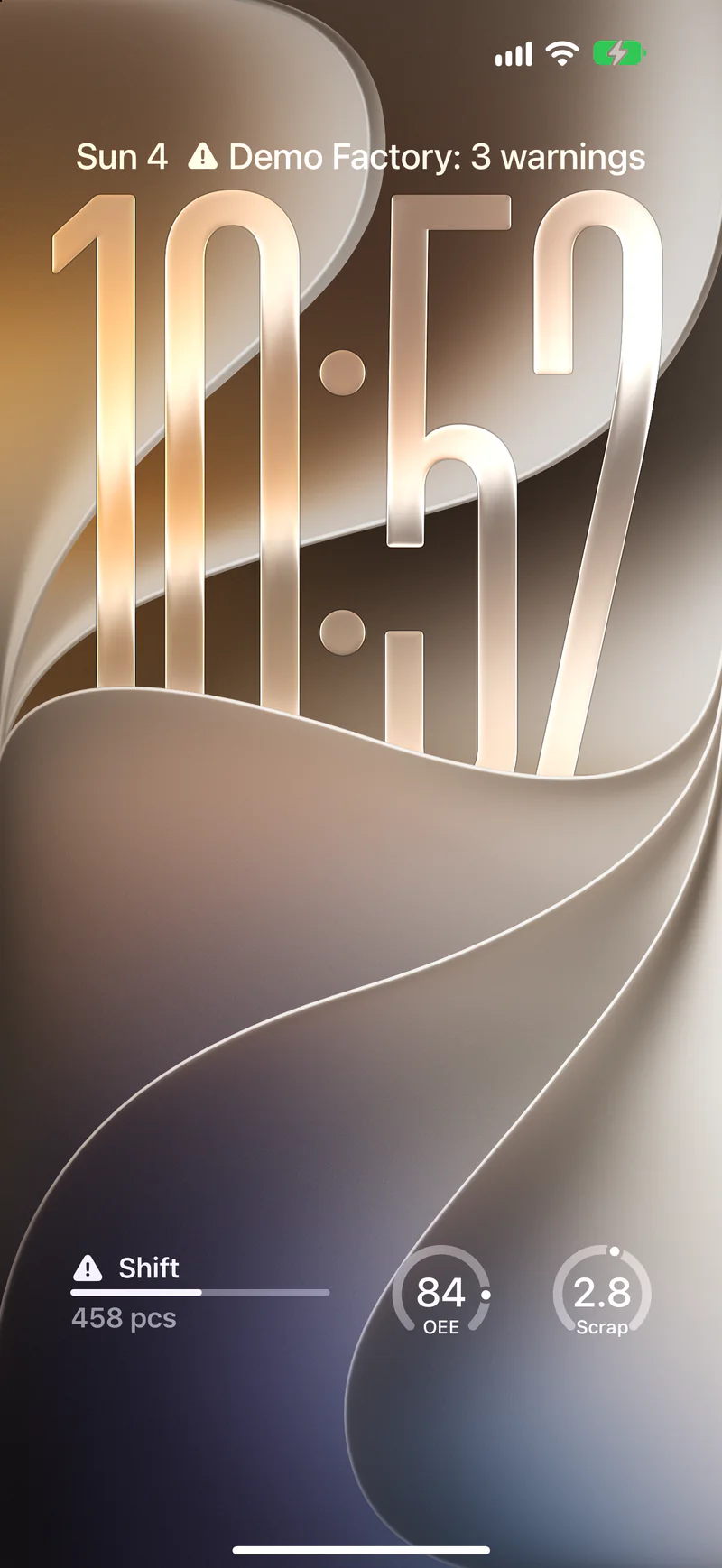
Status, OEE and faults of your machines, from a single workstation to a whole line. From PLCs, OPC UA and MQTT as widgets on the lock screens of shift leads and maintenance. And nobody needs a way into your plant network.
Free for 7 days, then €4.99 a month.
Andon means lantern.
The term comes from the Toyota Production System. Andon is Japanese for a paper lantern. On the shop floor it is a signal anyone reads at a glance: is the machine running, does someone need help, has it stopped?
The machine raises it, or an operator does, with the andon cord or a button. Then someone comes to help. It is part of jidoka: a fault stops the process before it spreads.
Traditionally a stack light sits on the machine, and a board hangs above a line. But shift leads and maintenance are rarely standing in front of it. Digital andon takes the signal to the people who have to act.
- GreenThe machine is running.
- AmberHelp called, changeover, material running low.
- RedStopped, or a quality problem.
- GreyIn Andon: the source has gone quiet. That is a signal too.
Typical meanings; each plant sets its own.
The stack light is on the shop floor. You aren't.
Whoever has to act is elsewhere
Shift leads, maintenance, plant management: in the office, in the other hall, on the way home. They don't see the stack light on the machine.
No access to the plant network
A way in from outside to OT is rightly off limits. That rules out almost every app that wants to query data.
Andon systems are projects
MES and andon software mean specifications, hardware and a rollout. For a few machines and one question, that's too big.
A production line, to try.
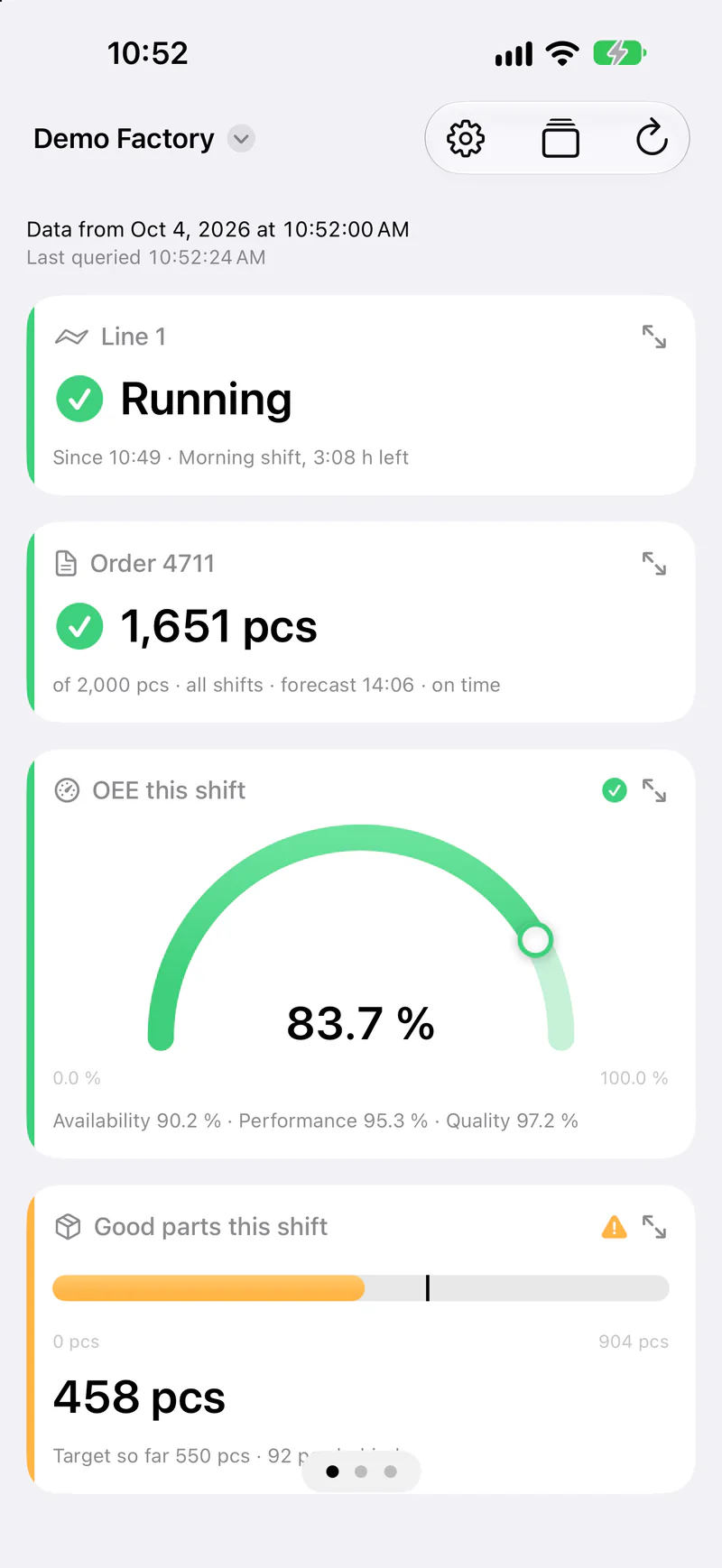
The demo simulates a line on the current shift. Scan the code with the Andon app and it runs on your iPhone.
- ✓State: the line is running, in changeover or stopped. Plus the order with its forecast.
- ✓KPIs: OEE with availability, performance and quality. Good parts against plan, scrap rate, cycle time.
- ✓Causes: downtime reasons, a defect tally, scrap per station.
- ✓History: parts and downtime per shift hour, the line's state across the shift.
Factory
A line on the current shift: is the line running, how many pieces so far, which station is down. Plus the timeline of the shift. Traffic-light colours, like the andon board on the floor.
From the PLC to the iPhone. No way back.
A Node-RED inside your network collects the values, encrypts them and sends them over an outbound HTTPS connection. Nothing leads into the plant network.
Collect
Node-RED reads values where they are: OPC UA from the machine's server, S7 straight from the PLC, MQTT from the broker. SQL and Modbus work too.
Judge and encrypt
A function node turns raw values into a verdict: running, changeover, fault. The Node-RED package encrypts and sends. The key stays inside your network.
To the device
When a status changes, your source wakes the widgets on paired devices, usually within a minute. If the source goes quiet, the view turns grey.
OEE and machine status: from raw value to verdict.
The PLC knows numbers, the shift lead wants a verdict. A function node between the source and andon out translates one into the other.
- ✓
msg.topicis what the source node sets: the NodeId for OPC UA, the variable for S7, the topic for MQTT. The table at the top maps them to tile IDs. - ✓The machine state becomes text with a colour: 1 running, 2 changeover, 3 fault. Anything unknown turns amber, never green.
- ✓The OEE tile judges itself: tick
status from bandsfor it in the view. - ✓The same pattern brings many machines into one view, or gives each machine a view of its own.
The package step by step: Andon for Node-RED.
// OPC UA client, S7 in or MQTT in → this node → andon out.
// msg.topic is what the source node sets: the NodeId,
// the S7 variable or the MQTT topic.
const TILE = {
  'ns=3;s="Press2"."State"':     't_state',
  'ns=3;s="Press2"."GoodParts"': 't_parts',
  'ns=3;s="Press2"."OEE"':       't_oee', // status from bands
};
// The machine state as the PLC counts it.
const STATE = {
  1: { value: 'Running', status: 'ok' },
  2: { value: 'Setup',   status: 'warning' },
  3: { value: 'Fault',   status: 'critical' },
};

const tile = TILE[msg.topic];
if (!tile) return null;
// OPC UA may hand over a DataValue: take the bare value.
const v = msg.payload?.value?.value ?? msg.payload;
if (tile === 't_state') {
  return { topic: tile,
    payload: STATE[v] ?? { value: 'Unknown', status: 'warning' } };
}
return { topic: tile, payload: v };
Digital andon, without a big project.
No change to OT
One outbound HTTPS connection. No inbound firewall rule, no VPN, no remote access.
Begin with one machine
One machine, a few tiles, one Node-RED. As it grows, you add machines, not systems.
Devices you already have
An iPad becomes a display at the machine, the shift lead's iPhone a stack light on the lock screen. No special hardware.
End-to-end encrypted
Production figures are trade secrets. The relay only passes on sealed envelopes and can't read them.
Questions about digital andon.
What does andon mean?
Andon is Japanese for lantern. In lean manufacturing it names a signal that shows the state of a process at a glance and calls for help when something is wrong. It comes from the Toyota Production System.
What is the difference between an andon light and an andon board?
The light, or stack light, sits on a single machine. The board hangs above a line or in the hall and shows several machines with their figures. Andon does both: a tile for a machine, a view for a line or a hall.
Do I need to open a port into the plant network?
No. Node-RED only sends out, over HTTPS to the relay. No rule for inbound connections is needed.
How do I get data from S7, OPC UA or MQTT?
With Node-RED and community nodes such as node-red-contrib-opcua and node-red-contrib-s7. Node-RED speaks MQTT out of the box. The Andon package then takes the values.
Does Andon replace an MES?
No. Andon shows states and figures; it doesn't plan, book or archive. If you have an MES, it can be a source for Andon.
Can an iPad serve as a display at the machine?
Yes. The app shows the whole view like an OEE dashboard and fetches new values every minute while it's open. On the home screen and lock screen, widgets show the most important tiles.
Andon elsewhere
Start with one machine.
Build tiles in the configurator, create a view, pair your devices. Node-RED inside your network does the rest.